Posts

Showing posts from August, 2017

Steps to Convert MBR to GPT Ubuntu / Debian with Images

Image
Step by Step conversion of MBR partition table to GPT & Install Grub-efi Steps to convert MBR to GPT partition table with UEFI grub. OS & Release :     lsb_release check to see if /sys/firmware/efi exists. [ -d /sys/firmware/efi ] && echo UEFI || echo BIOS Check Disk & Partition     fdisk  -l Here  20GB Disk, 18.3GB / partition & 1.5 GB swap , There are no space left on drive. EFI required approx 200M space with FAT16/32 file system. So we have to reduce old partition Check & change your bios setting ( legacy to uefi ) Step 1: Boot your system using live Ubuntu 16.4 . Create Live Ubuntu 16.4 Bootable pendrive OR  Boot Your system using bootable dvd/cd Step 2: After boot check to see if /sys/firmware/efi exists. [ -d /sys/firmware/efi ] && echo UEFI || echo BIOS Check disk Partition gdisk -l /dev/sda Step 3: Resize partition - Open gparted gparted Select Ubuntu installed disk for resize ( my disk ...
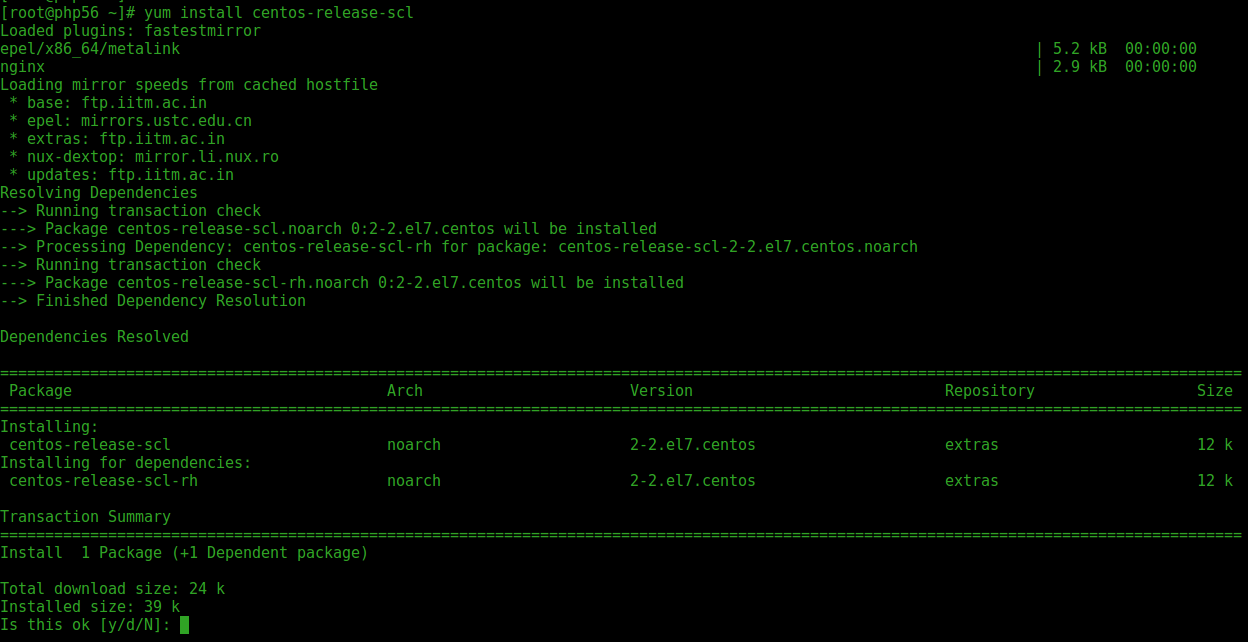
step by step upgrade php5.4 to php5.6

Image
How to Upgrade PHP version 5.4 to 5.6 on CentOS/RHEL  Step 1: Install the Centos SCL repository    yum install centos-release-scl Step 2: List PHP5.6 Package     yum list rh-php56\* Install 5.6 yum install rh-php56-php-devel yum install rh-php56-php rh-php56-php-devel rh-php56-php-mbstring rh-php56-php-gd rh-php56-php-fpm rh-php56-php-mysqlnd libxml2-devel PHP 5.6 File Structure : Configuration File (php.ini) Path            /opt/rh/rh-php56/root/etc Loaded Configuration File                        /opt/rh/rh-php56/root/etc/php.ini Scan this dir for additional .ini files       /opt/rh/rh-php56/root/etc/php.d command path                          /opt/rh/rh-php56/root/bin/...

Upgrade php5.4 to php5.6

Image
How to Upgrade PHP version 5.4 to 5.6 on CentOS/RHEL  Step 1: Install the Centos SCL repository    yum install centos-release-scl Step 2: List PHP5.6 Package     yum list rh-php56\* Install 5.6 yum install rh-php56-php-devel yum install rh-php56-php rh-php56-php-devel rh-php56-php-mbstring rh-php56-php-gd rh-php56-php-fpm rh-php56-php-mysqlnd libxml2-devel PHP 5.6 File Structure : Configuration File (php.ini) Path            /opt/rh/rh-php56/root/etc Loaded Configuration File                        /opt/rh/rh-php56/root/etc/php.ini Scan this dir for additional .ini files       /opt/rh/rh-php56/root/etc/php.d command path                          /opt/rh/rh-php56/root/bin/...

steps to compile wpa_supplicant ubuntu 16

Image
Q . Step by Step wpa_suplicant 2.6 compile in Ubuntu 16.4 Q. How to compile wpa_supplicant 2.6 in Ubuntu  wpa_supplicant is IEEE 802.1X/WPA component that is used in the client stations. It is a cross-platform supplicant with support for WPA2 , WPA and WEP  (IEEE 802.11i / RSN (Robust Secure Network)). It is work on desktops, laptops and embedded systems. wpa_supplicant is the. OS - Ubuntu 16.4 Xenial lsb_release -a Step 1 Install Requirement Packages apt install libssl-dev build-essential checkinstall  pkg-config apt install dbus libdbus-1-dev libdbus-glib-1-2 libdbus-glib-1-dev libreadline-dev libncurses5-dev apt install libnl-genl-3-dev libnl-3-dev Step 2  Download wap_supplicant source package & Extract cd /tmp https://w1.fi/wpa_supplicant OR wget https://w1.fi/releases/wpa_supplicant-2.6.tar.gz wpa_supplicant2.6.tar.gz Extract  wpa_supplicant2.6.tar.gz tar xvf  wpa_supplicant2.6.tar.gz Step 3 Create a build configuration file that should work for...

compile wpa_supplicant ubuntu

Image
Q . Step by Step wpa_suplicant 2.6 compile in Ubuntu 16.4 Q. How to compile wpa_supplicant 2.6 in Ubuntu  wpa_supplicant is IEEE 802.1X/WPA component that is used in the client stations. It is a cross-platform supplicant with support for WPA2 , WPA and WEP  (IEEE 802.11i / RSN (Robust Secure Network)). It is work on desktops, laptops and embedded systems. wpa_supplicant is the. OS - Ubuntu 16.4 Xenial lsb_release -a Step 1 Install Requirement Packages apt install libssl-dev build-essential checkinstall  pkg-config apt install dbus libdbus-1-dev libdbus-glib-1-2 libdbus-glib-1-dev libreadline-dev libncurses5-dev apt install libnl-genl-3-dev libnl-3-dev Step 2  Download wap_supplicant source package & Extract cd /tmp https://w1.fi/wpa_supplicant OR wget https://w1.fi/releases/wpa_supplicant-2.6.tar.gz wpa_supplicant2.6.tar.gz Extract  wpa_supplicant2.6.tar.gz tar xvf  wpa_supplicant2.6.tar.gz Step 3 Create a build configuration file that should work for...